

Route Optimization for bulk material delivery.
BulkTrackPro's route optimization sequences each day's bulk deliveries into the most efficient order so drivers cover fewer miles and fit more stops per run. It reorders the route to save drive time. It never moves a stop out of the delivery window you promised the customer.
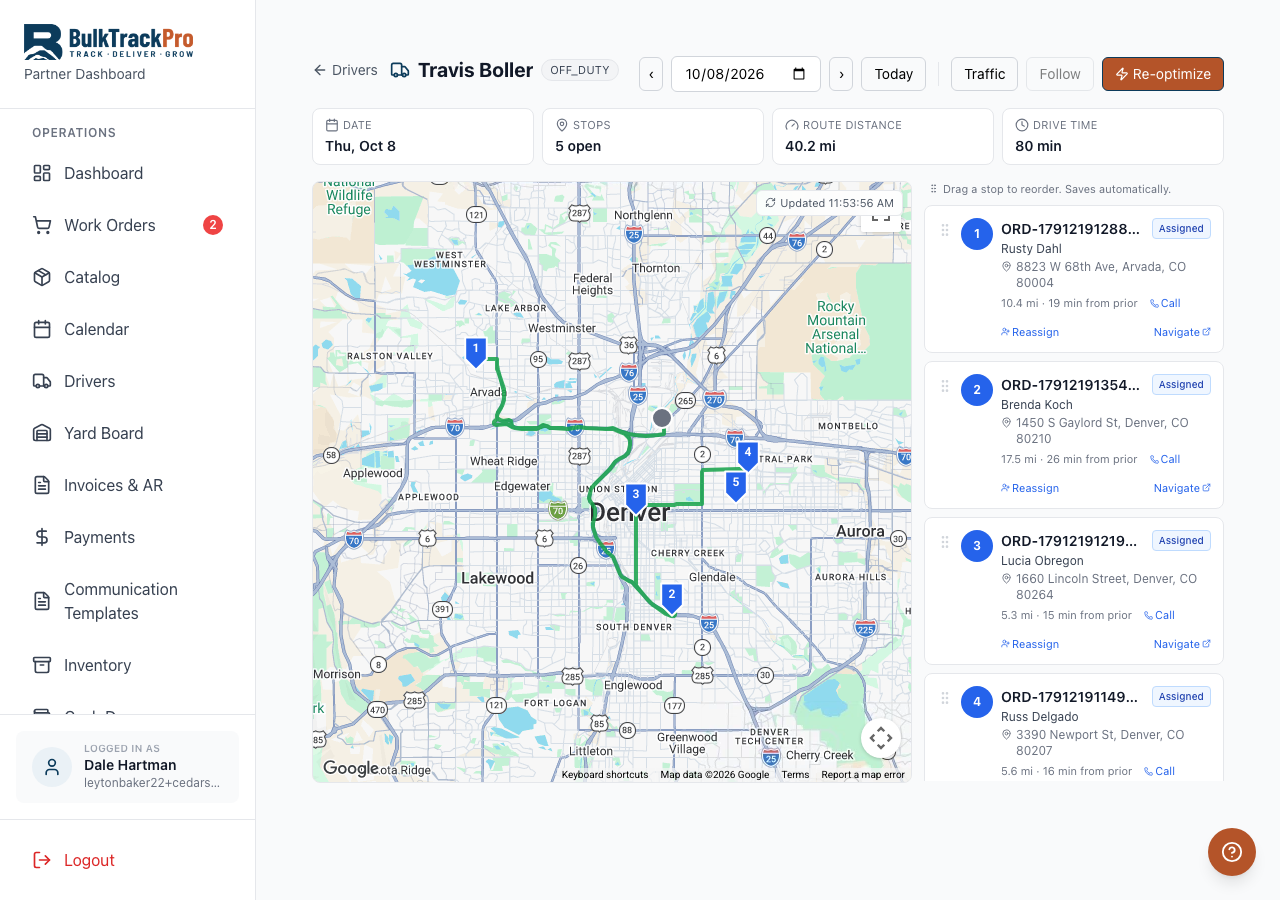
Built into the platform.
Fewer miles, more stops
Optimized ordering means less backtracking across town, so a truck completes more deliveries per shift on the same fuel and hours.
Promised windows protected
Optimization reorders the sequence for efficiency but always keeps every stop inside the delivery time window the customer was given.
Clear driver dispatch
Each driver sees an ordered stop list with address, delivery window, and the materials to drop. No paper routes or guesswork.
Fewer status calls
Paired with SMS notifications and live tracking, customers know when the truck is coming, so dispatch spends less time on the phone.
From dispatch board to shortest run.
Assign the day's orders
Add scheduled deliveries to a driver or truck for the day from the dispatch board.
Optimize the sequence
BulkTrackPro orders the stops for the shortest efficient route while respecting each stop's promised delivery window.
Send drivers on their way
Drivers get the ordered stop list on their phone with addresses, windows, and materials for each drop.
Track and notify
Follow progress on the map and send customers automatic updates as the truck moves through the route.
Questions, answered.
Does optimizing move my customers' delivery times?+
No. Route optimization only reorders the sequence of stops to reduce drive time. It never moves a delivery outside the window you promised the customer.
Can I still adjust the route manually?+
Yes. Dispatchers can reorder or reassign stops by hand at any time. Optimization is a starting point, not a lock.
Does this work with multiple trucks?+
Yes. You can assign orders across multiple drivers and trucks and optimize each route independently from the dispatch board.
How do customers know when the driver is coming?+
With the SMS notifications add-on, customers get automatic delivery notifications and can receive a live tracking link so they see the truck approaching.
Cover fewer miles, fit more stops.
Route Optimization is one piece of the platform built for mulch, topsoil, gravel, and aggregate suppliers. Book a demo and see it running with your own products.